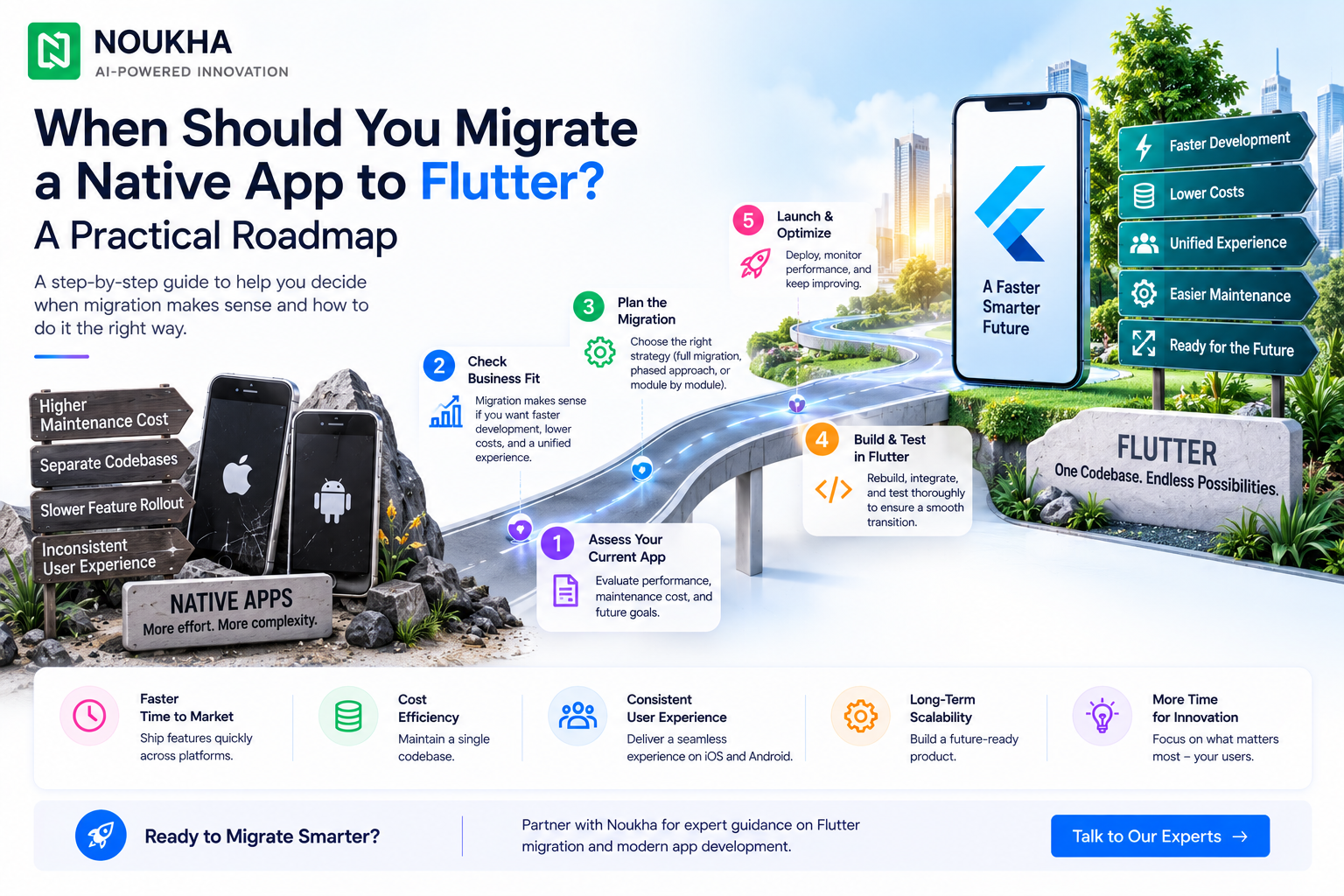
When Should You Migrate a Native App to Flutter? A Practical Roadmap
Quick answer: migrate when duplicated iOS and Android work is materially slowing releases, creating inconsistent experiences or increasing maintenance cost—and when Flutter supports the app’s most important device integrations. Do not migrate only because a framework is popular. A working native app has accumulated business rules, user trust and operational knowledge that must be protected.
For most established products, the safest strategy is incremental. Flutter’s add-to-app capability allows teams to introduce Flutter modules inside an existing iOS or Android application. That creates a path to test architecture, performance and team readiness before committing to a full replacement.
Signs that migration may be justified
- Every significant feature is implemented twice and the two platforms regularly drift apart.
- Release coordination is slow because separate teams, backlogs and test cycles must converge.
- The existing UI is due for a major redesign, reducing the value of preserving old presentation code.
- Hiring or retaining two complete platform teams is becoming difficult.
- The roadmap contains many shared workflows and relatively few highly specialized native features.
- Maintenance work consumes capacity that should be used for product growth.
One signal alone is rarely enough. The business case becomes stronger when several are present and can be measured—for example, average release delay, duplicate defect volume, platform parity gaps and maintenance cost per quarter.
When you should not migrate yet
Migration is a poor first response to unclear product strategy, unreliable backend services or weak release discipline. A new UI framework cannot repair unstable APIs, missing automated tests or inconsistent requirements. Stabilize those foundations before moving the client application.
Be cautious when the product depends on highly specialized native SDKs, background execution, low-level Bluetooth, complex media pipelines, health-device data or newly released operating-system capabilities. Flutter can communicate with Swift and Kotlin through platform channels and plugins, but the amount of custom native work may erase the expected efficiency gains.
A migration may also be unnecessary when the existing native apps are stable, the teams release predictably, and customers benefit from deeply platform-specific experiences. The best technical decision is sometimes to keep what already works.
The business case: measure total change, not lines of code
A migration estimate should include product discovery, design-system reconstruction, analytics parity, accessibility, automated tests, data migration, authentication, deep links, push notifications, store compliance, release engineering and post-launch support. Rewriting screens is only one part of the work.
Compare the migration cost with a realistic “stay native” baseline over two or three years. Include the cost of duplicated features, separate regression cycles, platform-specific defects and delayed launches. The useful question is not “Will Flutter be cheaper this quarter?” but “Which model gives us the lowest risk-adjusted cost for the roadmap we intend to deliver?”
Noukha’s Flutter app development services in the USA can support this assessment, while the US mobile app development cost guide provides a broader framework for budgeting design, engineering, QA and maintenance.
A low-risk migration roadmap
Phase 1: Audit the current product
Create an inventory of screens, business rules, APIs, local storage, analytics events, deep links, accessibility requirements and third-party SDKs. Mark which capabilities are shared, platform-specific or uncertain. Review crash data, support tickets and performance telemetry so the migration targets real problems.
Phase 2: Define measurable success criteria
Set acceptance thresholds before writing Flutter code: startup time, frame stability, crash-free sessions, accessibility conformance, binary size, test coverage and release frequency. Add business measures such as conversion, task completion and support contacts. “Looks the same” is not a sufficient definition of success.
Phase 3: Build a proof-of-concept around the hardest risk
Do not prove Flutter with the easiest settings screen. Test the riskiest differentiator: camera capture, mapping, streaming, background synchronization, payments or a complex dashboard. The prototype should confirm plugin maturity, native interoperability and device performance.
Phase 4: Choose the migration pattern
| Pattern | Best when | Primary risk |
| Full rewrite | The product is small, the architecture is obsolete, and a major redesign is already approved | Long period before users receive value |
| Feature-by-feature add-to-app | The app is established and can be divided into stable modules | Temporary complexity across two technology stacks |
| Platform-first migration | One platform has substantially greater urgency or technical debt | Parity may remain uneven during transition |
Phase 5: Establish shared architecture and design foundations
Define navigation, state management, dependency injection, networking, error handling, logging, localization, theming and test strategy before multiple teams create incompatible patterns. Flutter’s architecture guidance emphasizes clear separation of UI and data responsibilities for scalable applications. Adapt the guidance to the product rather than adopting a pattern mechanically.
Phase 6: Migrate vertical slices
Move complete user journeys rather than isolated visual components. A vertical slice includes UI, business logic, analytics, errors, tests and release behavior. This makes each increment independently testable and valuable. Start with a contained flow that matters to users but does not threaten the core transaction path.
Phase 7: Run both implementations and compare
Use feature flags or staged rollout where practical. Compare crash rate, performance, conversion and support signals between the existing and migrated flows. Preserve rollback capability until the Flutter path has demonstrated stability in production conditions.
Phase 8: Retire native code deliberately
Remove old modules only after data, deep links, analytics, accessibility and edge cases are verified. Update operational documentation, ownership boundaries and incident procedures. A migration is complete when the organization can maintain and release the new app reliably—not when the last screen compiles.
Testing requirements that protect the migration
- Golden and visual-regression tests for critical layouts and themes.
- Unit tests for migrated business rules, especially calculations and permissions.
- Integration tests for authentication, payments, notifications, links and offline recovery.
- Performance testing on representative low, mid and high-range devices.
- Accessibility testing with screen readers, text scaling, contrast and keyboard navigation where relevant.
- Store-release rehearsals, monitoring dashboards and a documented rollback plan.
Internal links for migration planning
Teams replacing both client applications should also review Noukha’s iOS app development services in the USA and Android app development services in the USA. These pages help identify the platform-specific work that may remain after Flutter becomes the main shared layer.
Operational planning after the code migration
A new framework changes more than the repository. Update build agents, signing processes, dependency scanning, store-release checklists and incident ownership. Confirm who monitors Flutter and plugin releases, how upgrades are tested and how emergency native fixes will be handled. A product can be technically migrated yet operationally fragile if these responsibilities remain unclear.
Training should be role-specific. Native engineers need a path into Dart, Flutter widgets, state management and debugging. QA teams need stable test identifiers and a revised automation strategy. Product and design teams need guidance on which interface elements are shared and which remain platform-adaptive. Support teams need updated diagnostic information so they can distinguish backend, Flutter and host-platform problems.
Plan a defined stabilization period after each major release. Track crash-free sessions, cold start, API failures, abandoned journeys and store feedback against the original baseline. Treat unexpected regressions as evidence for the next migration slice, not as reasons to accelerate blindly. The purpose of phased delivery is to learn while rollback remains possible.
Frequently asked questions
Can we add Flutter without rewriting the whole app?
Yes. Flutter supports an add-to-app model in which Flutter modules are integrated into an existing Android or iOS host application. This is useful for phased migration, but the team must manage navigation, lifecycle, build pipelines and communication between native and Flutter layers carefully.
How long does a native-to-Flutter migration take?
It depends on product size, automated-test coverage, integration complexity and the chosen migration pattern. A reliable estimate follows an inventory and proof-of-concept; screen count alone is not enough.
Will all native code disappear?
Not necessarily. Some platform services may remain in Swift or Kotlin, connected through plugins or platform channels. The goal is appropriate code sharing, not eliminating native code at any cost.
How do we avoid disrupting existing users?
Use phased delivery, compatibility testing, telemetry, feature flags where possible, staged store rollouts and a rollback plan. Preserve user data, authentication state, deep links and analytics continuity as explicit acceptance criteria.
Final recommendation
Migrate when the future cost of two separate apps is greater than the controlled cost of change, and when Flutter has been validated against the product’s hardest technical requirements. For a mature app, prefer incremental add-to-app delivery, measurable acceptance criteria and production comparison over a big-bang rewrite.